


ebtEDGE NEW!
3.1420.00 Reviews
App Specs
- Version
- 4.0.1
- Updated On
- License
- Free
- Downloads
- 100,000+
- Developer
- Fidelity Information Services LLC
- Categories
- Finance
- Platform
- Android
Screenshots
 Analysis by AppCompare
Managing public benefits from a phone can be convenient, but convenience depends heavily on whether the app works when you need it. I spent time looking at ebtEDGE as a finance app for SNAP, Childcare, and WIC benefits, and my main takeaway is simple: it is most useful when you treat it as a connected account-management tool rather than a complete replacement for every state service. The app can put benefit information closer at hand, yet the quality of the experience is tied to your phone, your connection, and the way your state handles these programs.
That distinction matters in ordinary situations. You might be standing in a checkout line, trying to remember whether your balance is enough for a planned purchase. You may be away from home and need to check benefit details before changing your shopping list. Or you may be helping a family member keep track of separate assistance programs. In those moments, opening a dedicated app is often easier than searching through old messages or trying to remember a web address.
At the same time, I would not install it expecting a general-purpose banking app. It is focused on benefit access, and its usefulness comes from that narrow purpose. The developer is Fidelity Information Services LLC, the app is free, and its Everyone age rating makes it suitable for a broad household audience. The current version is 4.0.0, with Android support beginning at version 7.0, so compatibility should be reasonable for many older devices.
What the app is really like when your connection matters
When I rely on a phone to check benefit information, the connection is part of the workflow, not a small technical detail. In this section, I look at how I would prepare before leaving home, what I would try if a check stalls, and why a backup route matters when timing is tight. That practical setup also helps clarify which parts of the experience are best handled in the app and which may call for another channel.
Checking information while moving through the day
The strongest use case is quick, purposeful checking. Benefit management is often done in short moments rather than during a long session at a desk. I can imagine opening the app before entering a store, reviewing what I need, and then putting the phone away. That is a better fit for a phone than a complicated desktop-style portal that expects you to sit down and work through several pages.
This mobile context also changes how carefully I would use it. A phone screen encourages fast decisions, which is helpful when I am comparing a shopping list with available benefits. But it also makes it easier to tap quickly, overlook a message, or close the app before checking whether the information refreshed. My practical advice is to slow down at the important moments: confirm the relevant program, check the displayed information, and avoid assuming that a screen has updated simply because it opened.
For households using more than one benefit program, the app has a potentially useful organizational role. SNAP, Childcare, and WIC needs do not always arise at the same time, so I would use it as a central place to begin rather than jumping between unrelated tools. The non-obvious advantage here is not just having an app installed; it is building a small routine around it. For example, checking before shopping can help separate “what I have available” from “what I think I have available,” which reduces unpleasant surprises at checkout.
Worth Reading Before You Choose

EA SPORTS FC Mobile 26 Is a Bigger Football Game, but It Takes Time

Flipboard Shows What News Apps Must Do Beyond the Feed

Switching to Android Auto Means Rethinking Your Driving Routine

Google Calendar Makes a Crowded Week Easier to Manage

Ludo King Makes the Most of the Minutes Between Plans

Baby Panda World Brings Quick Play to Modern Phones, but Its Game Library Feels Busy
That routine is especially valuable for someone who shares shopping responsibilities with another person. One family member can check information before leaving home, while another can use the same general process later. I would still be careful about account security and would not hand an unlocked phone to someone casually. Benefit information is personal, even when the app itself feels simple.
Why a live connection changes the experience
The app’s practical value is closely connected to communication with its service. When I need current account information, I want the app to retrieve it rather than make me rely on memory. This means a reliable mobile connection or Wi-Fi can be the difference between a useful check and a frustrating pause. In a strong signal area, the process should feel naturally suited to quick checks. In a weak signal area, the same task may become slow or uncertain.
I would plan around that rather than treating connectivity as a minor technical detail. Before leaving for a store, I would check important information while connected to dependable Wi-Fi or a strong mobile signal. That small habit is more useful than waiting until the checkout line, where poor reception, crowded networks, or a busy phone can make the timing uncomfortable.
There is also a trade-off between freshness and convenience. A current balance or benefit detail is more helpful than a note I wrote down yesterday, but retrieving current information may require communication at the exact moment I open the app. I would not assume that a screen viewed earlier remains current after making purchases or receiving an adjustment. For high-stakes decisions, I would refresh when possible and keep a backup plan for contacting the appropriate state service if the app cannot complete the request.
This is where ebtEDGE differs from a paper note, a saved screenshot, or a general budgeting app. Those alternatives may be available without a live connection, but they can quickly become outdated. A budgeting app can help plan spending, yet it is not designed around SNAP, Childcare, and WIC benefits. The dedicated app is therefore better for checking benefit-related information, while a note or budgeting tool may still be useful for planning around that information.
Using it in real mobile situations
Consider a realistic afternoon: I am on the way to a grocery store, my shopping list has changed, and I want to confirm what I can reasonably buy before entering. If the app opens and communicates normally, I can make a better decision without returning home or asking someone else to search for the information. That is the kind of small time-saving moment that makes a specialized finance app worthwhile.
Now change the conditions. I am in a basement store area, my signal is weak, and I need an answer immediately. I would not keep retrying blindly while standing at the register. I would move to a place with better reception, use a trusted Wi-Fi connection if available, or pause the purchase rather than guessing. The app may be convenient, but it cannot remove the practical limits of a phone that cannot communicate.
Another useful mobile workflow is preparing before travel. If I know I will be away from my usual area, I would open the app while connected, review what I need, and make sure I remember the sign-in details or recovery method associated with my account. I would not rely on a screenshot as a permanent substitute for current information, but having a clear plan reduces pressure if reception becomes unreliable later.
For caregivers, the situation can be more complicated. A caregiver may be helping someone check benefits while also managing a child, shopping, or traveling between appointments. In that case, the app’s value is speed, but the risk is rushing. I would use a short checklist: confirm whose account is open, verify which benefit program is relevant, and avoid making assumptions based on an old screen. That is a simple discipline, but it prevents the kind of mistake that can happen when a small phone display is used in a hurry.
What to do when loading fails or information looks wrong
Every connected app needs a recovery plan, and this one is no exception. If a page does not load, I would first check whether other apps or websites are also having trouble. That helps distinguish a local connection problem from an issue limited to the app. I would then try a more stable connection, close and reopen the app, and give the request a moment instead of repeatedly tapping the same control.
Repeated attempts are not always productive. They can create confusion about whether a request succeeded, especially if the screen changes slowly. My preferred approach is to make one careful attempt, wait for a clear result, and then verify the information before acting on it. If the app returns to a sign-in screen, I would avoid guessing passwords again and again. I would use the account recovery route available within the service rather than risking a temporary lockout or losing track of which credentials I tried.
A particularly important recovery habit is separating an app problem from a benefit-account problem. If the app cannot connect, that does not automatically mean the benefit information has changed. Conversely, if the displayed information seems unexpected, I would not assume a refresh will solve everything. I would record the time, note what I saw, and contact the relevant official support channel when the issue affects an immediate purchase or essential household need.
I also recommend keeping the app updated when an update is offered through the normal app-store process. The listed version is 4.0.0, and using the current release can be sensible for compatibility and bug fixes. Still, I would not update at the exact moment I am standing in a checkout line unless necessary. Updates can take time and may require a stronger connection, so handling them at home is a calmer approach.
Recovery is also about battery and device readiness. A phone with very little charge is effectively disconnected, even if the network is excellent. Before a long shopping trip, I would charge the phone and avoid closing myself into a situation where the app is the only way I expect to access important information. This is not a criticism unique to ebtEDGE; it is simply the reality of using a phone as a benefit-management tool.
Keeping mobile data use sensible
For most people, occasional account checks should be manageable, but I would still be deliberate about mobile data. The app is not something I would leave open continuously. I would launch it when I have a clear task, complete that task, and close it. Using Wi-Fi at home for routine checks can reduce pressure on a limited data plan, especially for households that already use the phone for school, work, video, and messaging.
There is a privacy reason to be selective as well. I prefer checking personal financial information on a trusted connection rather than an unfamiliar public network. If I am in a café, library, or shared space, I would consider waiting until I have a more dependable connection, particularly if the task involves signing in. Convenience is useful, but it should not encourage careless handling of account details.
One practical tip is to avoid refreshing repeatedly just because the first screen feels slow. A weak connection can make repeated requests consume more time and possibly more data without producing a better result. I would wait, check the connection, and try again once. If the information is needed urgently, switching locations is often more effective than tapping refresh over and over.
I would also avoid treating saved images or notes as official records. They can help me remember what I checked before leaving home, but they become less trustworthy after a purchase, adjustment, or other account change. The trade-off is clear: offline reminders are convenient, while connected information is more appropriate when accuracy matters. Using each for the right purpose is safer than expecting one method to do everything.
How it compares with familiar alternatives
The usual alternatives each solve a different part of the problem. A state website may be preferable when I need a larger screen, more room to read instructions, or a longer account-management session. A phone browser can be useful if I do not want another app installed, although it may feel less direct during a quick store visit. A paper record is easy to access but can become outdated. A general finance app may help with household budgeting, yet it does not have the same benefit-specific focus.
For quick mobile checks related to SNAP, Childcare, and WIC, I would choose the dedicated app over a handwritten note. For detailed reading or troubleshooting, I might prefer a browser or larger device. For planning monthly household spending, I would pair it with a budgeting method rather than expecting it to replace one. That combination reflects the app’s real role: it can support decisions about benefits, but it is not intended to be the entire financial system for a household.
The app has attracted over one hundred thousand installs, while its average rating is 3.2 from around six hundred ratings. I read that as a reason to keep expectations practical. It is not a signal that the app is unusable, but it does suggest that real-world experiences are mixed enough to justify having a backup routine. I would judge it by whether it reliably helps with my specific benefit checks, not by assuming that a dedicated app will always be smooth.
The free price is a meaningful advantage for people who need access to benefit information without adding another subscription to the household budget. The drawback is that free does not mean frictionless. Connection quality, account access, device age, and state-specific handling can all affect the experience. On an older Android phone, the minimum operating-system requirement of 7.0 is reassuring, but performance can still depend on the device itself and how much space or battery is available.
Who should use it and who should be cautious
I think ebtEDGE is a sensible choice for someone who regularly manages SNAP, Childcare, or WIC benefits from a phone and wants a focused place to begin. It is especially useful for people who make frequent shopping decisions, travel between locations, or help organize benefits for a household. The best results will come from users who are comfortable checking information before a task and who understand that a connected app is not the same as a permanent offline record.
I would be more cautious if you rarely have dependable internet access, use a device that struggles with newer apps, or need extensive explanations rather than quick account access. In those cases, a state website, telephone support, or in-person assistance may be a better primary option. I would also not recommend relying on it alone for an urgent purchase until you have tested your sign-in and learned how it behaves on your own phone and connection.
Parents and caregivers should find the focused purpose helpful, but they should take extra care when switching between accounts or checking information while distracted. A short review before shopping can prevent a mistaken assumption. If another person is helping with benefits, I would make sure everyone understands which information is current and avoid sharing credentials casually.
My connectivity verdict
My final view is that ebtEDGE makes the most sense as a practical, connected companion for benefit management. Its value appears in small but important moments: checking before shopping, organizing a household routine, and avoiding decisions based only on memory. The app’s focus on SNAP, Childcare, and WIC benefits gives it a clearer purpose than a general finance tool, and the free cost lowers the barrier to trying it.
Its main weakness is not something I would ignore: the experience depends on the phone and the network at the moment you need it. I would install it, test access at home, use it before important trips, and keep an alternative way to get help when a connection or account problem interrupts the process. The smartest way to use this app is as a current-information check, not as your only safety net.
With that expectation, I can recommend it to eligible users who want benefit information within reach on Android. I would not promise a perfect experience in every location, and I would choose a browser or direct support for more involved issues. But for quick, purposeful checks during everyday life, it can earn a useful place on the phone, provided I plan for the moments when connectivity does not cooperate.
Pros
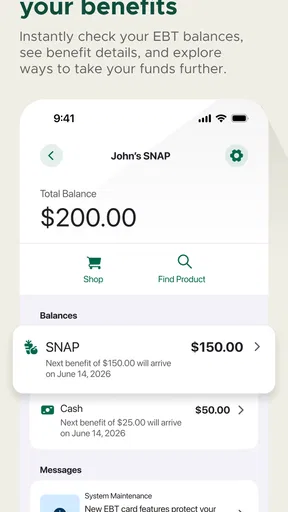
- Quickly view EBT balances and recent transaction history.
- Supports SNAP and cash benefits in one convenient mobile app.
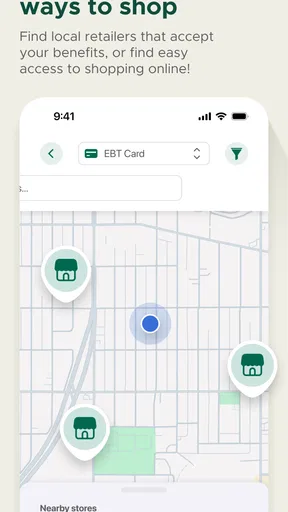
- Finds nearby retailers and ATMs that accept EBT cards.
- Transaction details help track spending and identify unfamiliar charges.
- Official account access reduces the need to call customer service.
Cons
- Availability and features may vary by state or benefit program.
- Requires an internet connection for most account functions.
- Login or verification issues can delay access to benefit information.
- Some users may find the interface less intuitive after the redesign.
- The app cannot replace customer service for card or eligibility problems.
FAQs for ebtEDGE NEW!
What is ebtEDGE NEW! used for?
ebtEDGE NEW! is a mobile companion for people who use eligible Electronic Benefit Transfer programs. After signing in with the required account details, users can typically review benefit information, check available balances, view recent transactions, and manage certain card-related options. The exact services shown may depend on the state or program that issued the EBT card, so availability can vary between users.
Can I use ebtEDGE NEW! to check my EBT balance and transaction history?
Yes, one of the main reasons to use ebtEDGE NEW! is to monitor your EBT account without calling customer service or visiting a benefits office. The app can display your current balance and recent activity after you log in. Keep in mind that balances may change after purchases or deposits, and transaction information can sometimes take time to update.
Is ebtEDGE NEW! available for every EBT cardholder?
The app is intended for participating EBT users, but access is not necessarily identical everywhere. Your eligibility depends on the state, territory, card issuer, and benefit program connected to your account. Some features may be available only in selected regions. If your card or state is not supported, you may need to use the official web portal or the customer-service number printed on your EBT card.
Does ebtEDGE NEW! help protect my EBT card if it is lost or stolen?
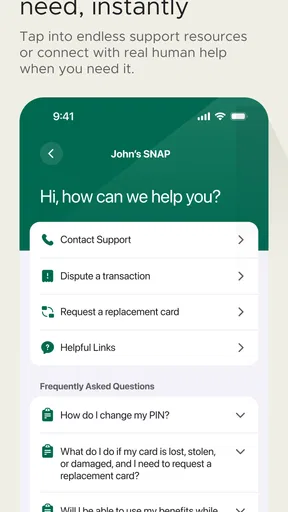
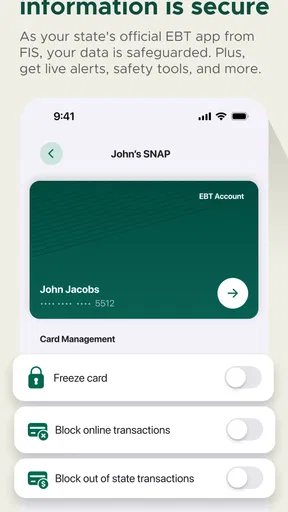
Depending on your location and card program, ebtEDGE NEW! may provide account-management tools such as temporarily locking a card, reporting an issue, or accessing card support. These options should not be assumed to replace immediate contact with the official EBT customer-service department. If your card is lost, stolen, or used without permission, report it as quickly as possible and follow the instructions provided by your card issuer.
Is ebtEDGE NEW! free, and what should I know before downloading it?
The ebtEDGE NEW! application is generally offered as a free download, although normal mobile-data charges may apply when using it over a cellular connection. Before installing, verify that you are downloading the official app from a trusted store and check its developer information, permissions, and recent updates. Never share your EBT PIN or login details with anyone claiming to provide unofficial assistance.


